Claude Code / Codex / Cursor
Every Claude Code run, in the notch you already have.
Your MacBook notch becomes a dashboard for every coding agent you run. See what is blocked, asking, or burning quota.
-
PersonalProjects·openGymYou: crop the sprite sheet into 32px tiles and dedupe the bordersBashcd /tmp/cropClaude Opus 5 Warp 70% now
-
work·api-gatewayYou: fix the flaky health-check test without touching prod configbusy·Editsrc/routes/health.tsClaude Sonnet 5 iTerm2 pane focused 41% 1mCard detail 1 of 1 4:12
The health-check test passes locally but fails on CI. Pin the rustls version, or mark the test flaky and move on?
⚠ permission · api-gateway
Edit src/routes/health.ts
21 const res = await probe(url);22- if (res.status !== 200) throw new Error();22+ if (!res.ok) throw new ProbeError(res.status);23+ return res.json();+2 −1agentRustls is pinned. The route table change is staged, apply is held pending your review.
youHold apply until I check the CIDR overlap with the staging VPC.
agentAcknowledged. Waiting; no further writes until you confirm.
-
infra·terraform-planYou: plan the VPC peering change and hold before applybusy completed Bashterraform plan -out=tf.planCodex gpt-6 kitty 62% 2m
-
dotfiles·nvim-configYou: migrate the LSP setup to the new vim.lsp.config APIblocked · waiting on youCursor Composer 1 WezTerm 18% 6mNeovim floor 1 of 2 2:48
The new vim.lsp.config API needs a minimum Neovim version. Pin 0.11, or keep a fallback for 0.10?
Every agent. One glance.
Claude Code, Codex and Cursor in a single view, with the run that just finished.
Answer without switching apps.
Any agent, the same card. Pick an option, or have the notch explain the question first.
Approve without switching apps.
The diff comes to the notch. Allow or deny with a keystroke, and the agent carries on.
Land on the exact tab.
One click focuses that agent's own terminal tab, not just the app.
Read the thread, reply in place.
Open a session for its conversation and answer without leaving what you are doing.
try it: pick an answer, jump a row, or type a reply
- 3agents tracked
- 6terminals it can jump to
- 0subprocesses per refresh
- 14+macOS, Apple silicon and Intel
The problem
Run five to ten agents at once and the bottleneck stops being the agents. It becomes you. Which one is blocked. Which one is burning quota. Which of nine identical terminal tabs that notification came from.
The panel, running
Three live sessions, their models and terminals, context and spend, read from the agents themselves while they work.
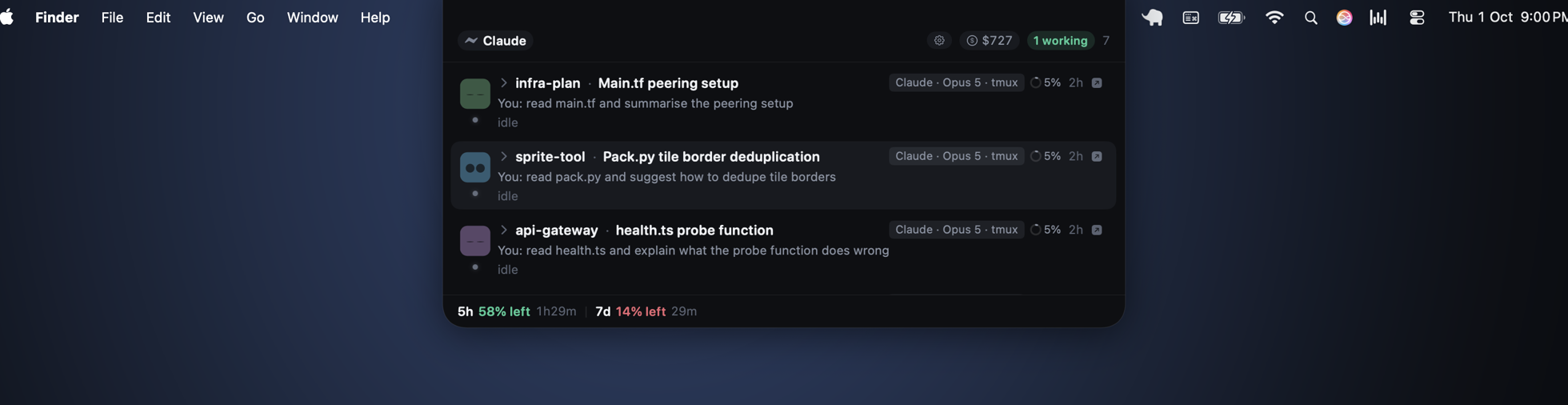
A real capture on this machine: the notch, in the menu bar, with three live sessions
What it shows you
Nine signals, three that matter most
-
Context-window pressure, per session
Each session reports how full its context window is, so you compact before hitting the limit, not after the agent starts forgetting.
-
Quota, burn rate, projected exhaustion
Usage windows with the current burn rate and the clock time the quota runs out, for both the short and the weekly window.
-
Died is not the same as finished
An agent that crashed is distinguished from one that completed its run. No more guessing at silent terminal tabs.
- One list, every agent.All running sessions in a single panel, labelled by vendor.
- Live session detail.Title, project, model, terminal, and the current tool call, updated as it happens.
- Stale questions stay put.Agents blocked on an old question remain visible without raising new alarms.
- Multi-part questions.A question with several parts is answered one at a time,
2 of 4. - Cost per model.Spend broken down by model, for today and this month.
- Remote sessions.Agents on machines you SSH into appear in the same panel as local ones.
What it lets you do
Unblock an agent without leaving what you are doing
Answer questions in the notch
Multiple-choice questions are answered where they appear, with a free-text field when none of the options fit. A sliding countdown returns the question to the terminal if you ignore it, and every interaction pushes the countdown forward, so it never times out under you mid-sentence.
- Approve with a keystroke.Permission requests approved from the notch with
⌥ space. - Review a full plan.Read and approve an agent's entire plan without opening its terminal.
- Hand it back.One click returns a question to the terminal if you would rather answer there.
- Quiet when you are watching.Notifications fire only when you are not already looking at the panel.
- Jump to the exact tab.Clicking a session focuses that agent's terminal tab, in the terminal that owns it.
How it works
Click a session, land in its exact terminal tab
Every session in the panel carries the handle of the terminal tab it is running in. That handle is read from the agent process's own environment: the variables the terminal exported when it spawned the shell. It is not read from any terminal's session database. When you click a row, Agent Island uses the handle to focus that specific tab, in the terminal that owns it.
The mechanism differs per terminal, and so does the permission it needs:
| Terminal | Handle | How it is focused | Permission |
|---|---|---|---|
| Warp | WARP_FOCUS_URL |
open the warp://session/… URL |
none |
| iTerm2 | ITERM_SESSION_ID |
AppleScript selects that session | asked once |
| Terminal.app | the controlling TTY | AppleScript selects the matching tab | asked once |
| kitty | KITTY_WINDOW_ID |
kitty @ focus-window |
none |
| WezTerm | WEZTERM_PANE |
wezterm cli activate-pane |
none |
Why not read the terminal's database? Approaches that read a
terminal's session store and replay keystrokes cannot distinguish tabs that
share a working directory, so in a monorepo, where six tabs all sit in
~/work/repo, they land on the wrong one. The environment handle is
unambiguous because the agent process itself carries it.
Three lines in, two lines out
$ git clone https://github.com/Tiwari1999/Agent-Island.git
$ cd Agent-Island
$ ./install.sh
$ python3 scripts/uninstall-hooks.py
$ rm -rf ~/Applications/AgentIsland.app
First launch: Agent Island is not notarized yet. On first open,
right-click the app and choose Open, then confirm. Required once;
subsequent launches are normal.
- no screen recording
- no full disk access
- no accessibility permission for jumping
- zero background processes when idle
- fast session discovery
Before you install
macOS says it cannot check the app for malicious software
It will. The build is not notarised yet, so Gatekeeper shows a dialog whose only buttons are Move to Trash and Cancel. The app is not quarantined for anything it does; it has simply not been through Apple's notary service.
To open it the first time: right-click (or Control-click)
AgentIsland.app in Finder, choose Open, then click
Open in the dialog that follows. That dialog does have an Open
button. macOS remembers the choice, so this is once per install.
If you prefer the terminal:
xattr -d com.apple.quarantine /Applications/AgentIsland.appWhat permissions does it ask for, and why
Automation, and only when you first click a row to jump. Focusing another app's window is an AppleEvent, so macOS asks once per terminal. Decline it and everything else still works; you lose the jump.
There is no accessibility permission, no screen recording, and no network access. Session data is read from files the agents already write on your own disk.
Which terminals does it work with
Jumping to the exact tab works in tmux, Warp, iTerm2, Terminal.app, kitty and WezTerm. Typing a reply back into the session works in tmux, iTerm2, kitty and WezTerm.
Terminal.app and Warp are read-only for replies on purpose: the only API either publishes runs its argument as a command rather than typing it, which is not a thing to point at someone's shell.
Does it slow the machine down
A refresh spawns zero subprocesses, and the test suite enforces that. Sessions are found by reading files, not by shelling out. When every agent is idle the panel animates nothing.
Which agents does it track
Claude Code, Codex and Cursor. Each is found through the files that agent already writes, so there is nothing to configure per project. Agents on machines you SSH into show up in the same list as local ones.
How do I remove it
Run python3 scripts/uninstall-hooks.py from the checkout,
then move the app to the Trash. The script removes the hooks it added and
leaves any other tool's hooks alone.
Stop counting terminal tabs.
Run as many agents as your quota allows. The notch keeps count for you.